April Fools Day passes swiftly, taking with it the usual jokes and false alerts that make you doubt everything for a day.
However, scammers don't stop for the holiday.
Spring marks a peak period for cybercriminal activity. It's not because people are careless, but due to the whirlwind of busyness and distraction that allows deceptive threats to slip unnoticed into your workday until it's too late.
Below are three current scams targeting not the careless, but diligent employees striving to get through their tasks safely.
As you review these examples, reflect honestly: Would my team consistently take the time needed to detect each scam?
Scam #1: The Fake Toll or Parking Fee Alert
An employee receives a text stating:
"You owe $6.99 on your toll account. Pay within 12 hours to avoid penalties."
The alert cites a genuine toll system such as E-ZPass, SunPass, or FasTrak, closely matching the employee's location. The small amount doesn't raise suspicion amid a busy day, prompting a quick payment.
But the link is fraudulent.
In 2024, the FBI logged over 60,000 reports of fake toll text scams, with reports soaring 900% in early 2025. Experts have uncovered more than 60,000 fake websites imitating state toll agencies — an indication of the scam's vast scope. Some messages even target residents where toll roads don't exist.
The trick is simple: a low-dollar charge feels harmless, and since most people have recently paid tolls or parking fees, the notification seems legitimate.
The best defense: official toll agencies never insist on immediate payment via text message. Organizations should enforce a strict policy of no payments through text links. Employees should always verify charges by visiting the official site or app directly and never respond to suspicious texts—even replying "STOP" confirms they're active and invites more scams.
Quick fixes lure victims; strict procedures safeguard them.
Scam #2: The "Your File Is Ready" Email
This scam merges seamlessly into everyday work flows.
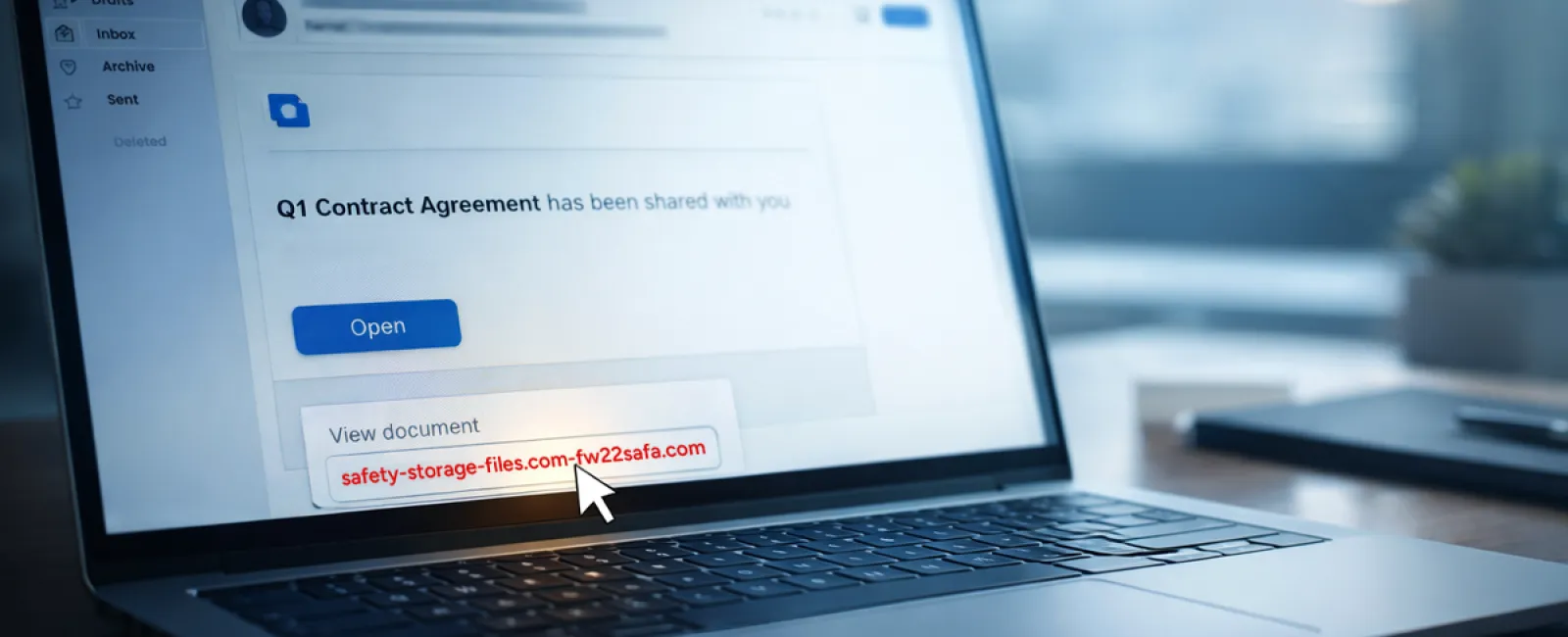
An employee gets an email saying a document was shared with them—often a routine contract in DocuSign, a spreadsheet on OneDrive, or a Google Drive file.
The sender's identity appears correct, and the email format matches legitimate file-share notifications.
The employee clicks, is asked to log in, and inputs work credentials.
At that moment, an attacker gains access to the company's cloud environment.
Phishing exploits leveraging platforms like Google Drive, DocuSign, Microsoft, and Salesforce surged 67% in 2025 according to KnowBe4's Threat Labs, with Google Slides phishing links alone spiking over 200% within six months.
Alarmingly, staff are seven times more likely to open malicious links from trusted services because the messages appear genuine and familiar.
Advanced scams use compromised accounts to send these sharing notifications via legitimate servers, bypassing spam filters since the emails are technically authentic.
Protective measure: Employees should never click unexpected file links in emails. Instead, log into the platform directly through a browser to verify the file's existence. Companies can minimize risk by limiting external sharing permissions and activating alerts for unusual login patterns—both simple IT settings that can be configured quickly.
Consistent caution delivers powerful protection.
Scam #3: Sophisticated, Polished Phishing Emails
Gone are the days when phishing emails were easy to spot by poor grammar or odd formatting.
A 2025 study showed AI-generated phishing emails caused a 54% click rate versus just 12% for human-written scams, proving their superior effectiveness. These messages incorporate authentic company details like roles and workflows, scraped rapidly from LinkedIn and corporate sites.
The latest scams are highly targeted: HR and payroll teams get fake employee verification requests, finance teams receive vendor payment change notifications. One test found 72% of staff interacted with vendor impersonation emails—90% more than other phishing attempts. These emails maintain a calm, professional tone with urgent but subtle requests, blending seamlessly into a typical workday inbox.
Effective defense: Any requests involving credentials, payment updates, or sensitive info should be confirmed via a second channel—be it a phone call, chat, or in-person conversation. Employees are trained to hover over sender addresses to check domains before clicking, and to treat urgency itself as a danger sign.
True security builds trust, not fear.
The Key Takeaway
All these threats rely on the tricks of familiarity, authority, timing, and the assumption that "this will only take a moment."
The real vulnerability isn't careless staff, but systems that expect everyone to always slow down, verify carefully, and make perfect decisions under pressure.
If a hasty click can disrupt your business day, that's a problem with your processes—not your people.
And the good news? Process improvements are within reach.
How We Can Support You
Most business owners want to avoid burdening themselves with additional projects or acting as the sole gatekeepers of cybersecurity.
They just want assurance their business isn't quietly at risk.
If you're worried about your team's exposure—or know someone who should be—we're ready to chat.
Book a direct discovery conversation where we will cover:
- Current cyber risks affecting businesses like yours
- How vulnerabilities sneak in during everyday work
- Practical strategies to reduce exposure without harming productivity
No pressure. No scare tactics. Just honest dialogue to uncover risks and explore ways to eliminate them.
Click here or give us a call at 506-383-2895 to schedule your free 15-Minute Discovery Call.
If this message doesn't fit your needs, please forward it to someone who would benefit. Sometimes, simply knowing what to watch for turns a near miss into a successful defense.